
Set monthly goals
Set a monthly revenue goal for Home, and record targets for sales, close rate, ticket size, leads and reviews.
Goals give your numbers something to measure against. Your monthly revenue goal drives the goal card and pace marker on Home. Owners and admins set goals in Settings → Goals.
Set your goals
- Go to Settings → Goals.
- Fill in the targets you care about. Leave a field blank to clear that goal.
- Click save in each section you changed.
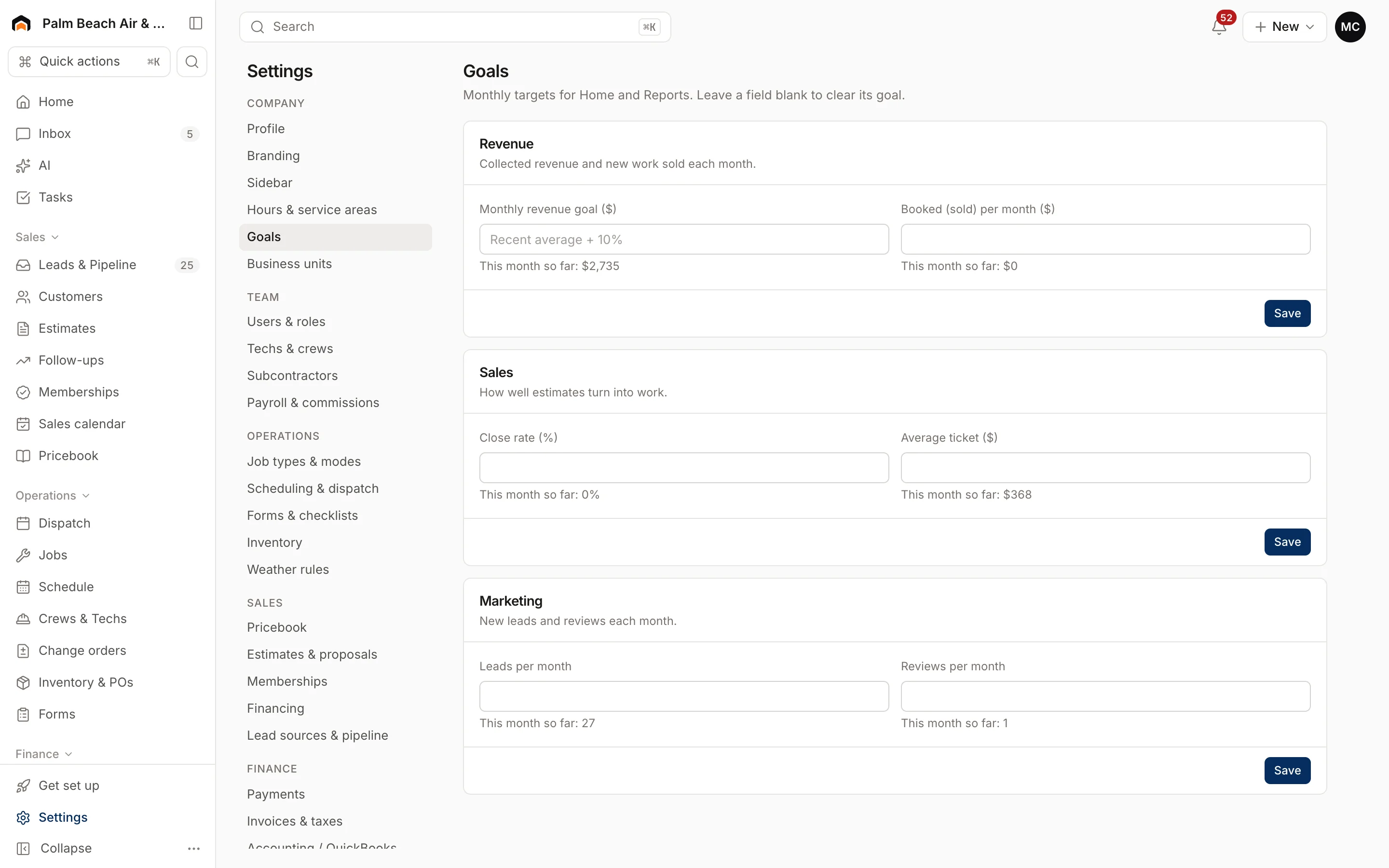
Under each field you'll see how you're doing this month so far, so you can set targets that are a stretch but realistic.
The goals
Revenue
- Monthly revenue goal ($): how much cash you want to collect each month. This is the goal on the Home page's Monthly revenue goal card and the Revenue booked tile.
- Booked (sold) per month ($): how much new work you want to sell each month.
Sales
- Close rate (%): the share of estimates you want approved.
- Average ticket ($): the average invoice you're aiming for.
Marketing
- Leads per month
- Reviews per month
If you don't set a revenue goal
Home still shows a goal. Homeforce takes your average monthly collections over the last three months, adds 10%, and rounds to the nearest $1,000. A brand-new company with no history starts at $50,000.
How the goal card works
On Home, the Monthly revenue goal card always covers the current calendar month, whatever date range you pick for the tiles:
- The bar shows cash collected so far as a share of the goal.
- A thin marker shows how far through the month you are. If the bar is past the marker, you're ahead of pace and the bar is green.
- Pace projects your month-end total at your current daily rate.
- Booked compares estimates approved this month to the same goal.
Was this helpful?
Related articles
Reports
Use the Home dashboard
Read the KPI tiles, monthly goal, needs-attention list and schedule on the Home page, and view it as a team member.
Reports
Reports overview
See revenue, invoicing, average ticket, close rate, team performance and lead source ROI for any recent period.
Reports
Track technician and sales performance
See visits, hours, revenue, close rate and sales for each tech and salesperson, and how each number is counted.
Reports
Measure lead source ROI
See which marketing channels bring in leads, booked jobs and revenue for what you spend.
Still stuck?
Our team answers support emails during business hours, usually within a few hours.