
AI estimates, follow-ups and dictation
Let AI draft good/better/best estimates from your notes, write estimate follow-ups, and turn a tech's spoken notes into clean visit notes.
Three AI helpers save time on the paperwork around a job. Each one drafts; you review and decide what goes to the customer.
Draft an estimate with AI
AI estimate builds good/better/best options from what the tech found, using items from your pricebook and the age of the equipment on site.
- Open the job, or the visit in the field app.
- Click AI estimate.
- In Draft good / better / best, describe what you found. Notes already on the visit are filled in for you. Example: "capacitor bulging, contactor pitted, coil dirty, 14-year-old Goodman".
- Click Draft estimate.
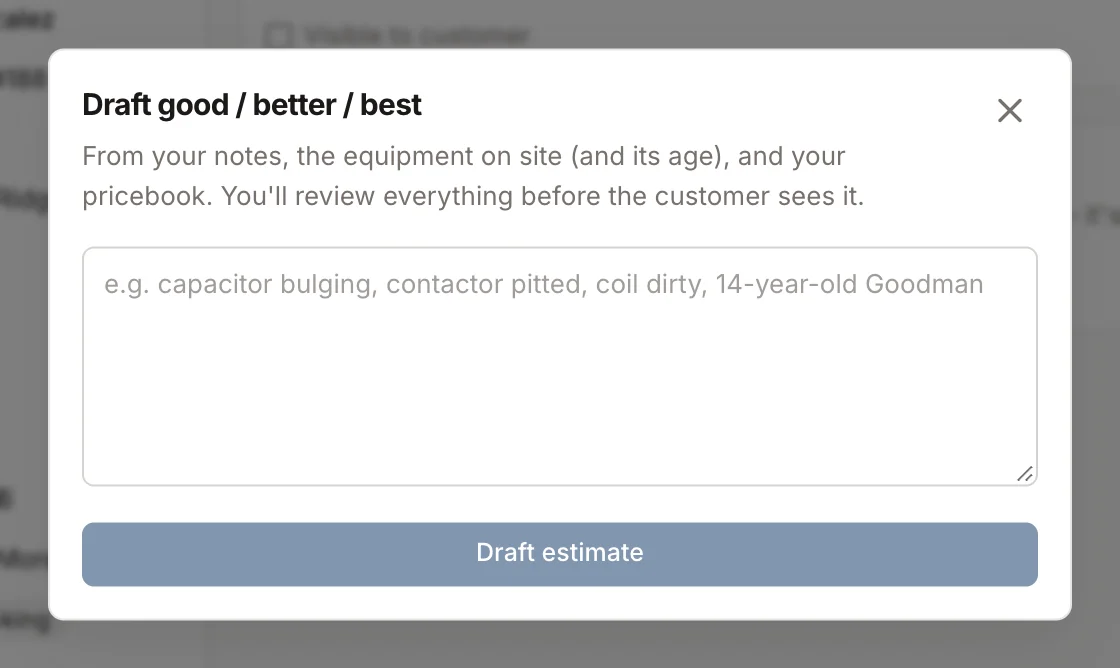
Homeforce creates a draft estimate and opens it. The middle option is marked as recommended. Nothing is sent. Check the items, quantities and prices, change anything that's off, then send it the way you normally would. See Create an estimate.
Write a follow-up on an open estimate
On an estimate that's been sent or viewed, click Write follow-up. Homeforce drafts a Personal follow-up: a short text message and an email, based on the options, equipment age, financing and how long it's been.
- Edit the text message if you want.
- Click Send text. It goes to the customer and shows up in their inbox thread.
The email draft is there for you to copy into your own email if you prefer. It isn't sent from this window.
Dictate visit notes in the field app
Techs can talk instead of type.
- On a visit in the field app, go to Talk it out and tap Dictate.
- Talk through what you found, what you did and what you'd recommend.
- Tap Stop.
- Review the Summary, Work performed and Recommendations Homeforce pulled out.
- Tap Save to visit.
Dictation works in English or Spanish. If a tech dictates in Spanish, the office notes are written in English and the original words are kept with them.
Was this helpful?
Related articles
Sales
Create an estimate
Start an estimate for a customer, add line items from your pricebook, and save it ready to present or send.
AI agents
AI in Homeforce
Every AI feature in Homeforce, what each one does, who can use it, and what the AI can and can't do on its own.
Mobile app
Get the mobile app and sign in
Install the Homeforce app on your iPhone or Android phone, accept your team invite, and sign in with a code, password or Google.
AI agents
Try the AI receptionist
How the AI receptionist qualifies callers and books into open time, how to test it in the simulator, and what its settings do today.
Still stuck?
Our team answers support emails during business hours, usually within a few hours.