
Score calls and sales visits with Coach
Coach scores recorded calls and sales conversations, tracks booking and close rates, and gives each rep tips for next time.
Coach reads your phone calls and in-home sales conversations and scores them. It looks at whether the call was booked or the sale closed, which objections came up and how they were handled, and whether add-ons were offered. Then it gives the rep specific tips.
Coach is on the Pro and Scale plans.
What you see
Go to AI → Coach.
- Owners and admins see every scored conversation and a Rep leaderboard with each rep's score, booking rate, close rate, objections handled and add-ons offered.
- Everyone else sees Your scorecard: just their own conversations.
The stats across the top show Avg score (30 days), Call booking rate, Sales close rate and Objections handled.
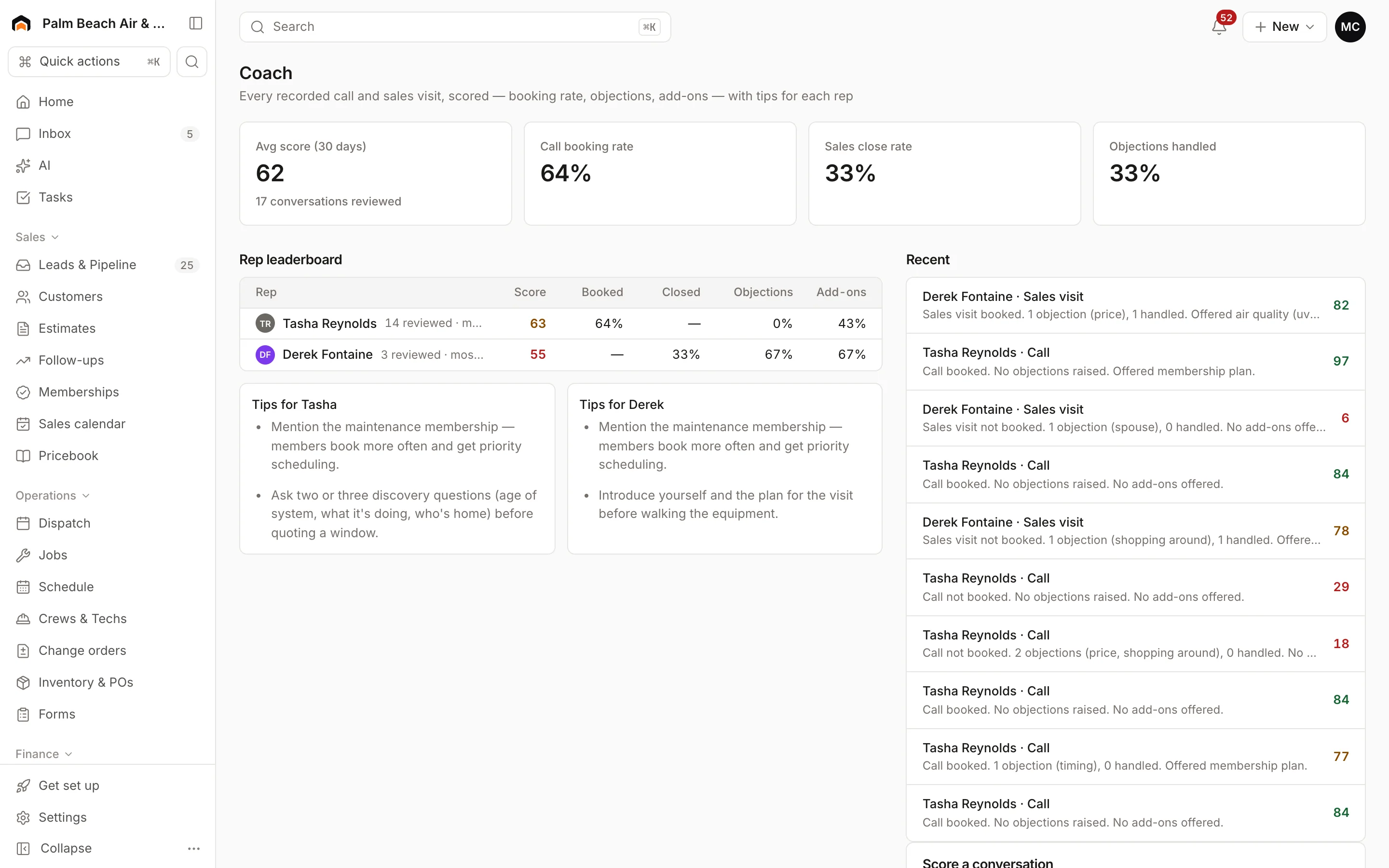
Click any conversation in Recent to open its review: the score, whether it booked or closed, objections (like price, timing, or shopping around), add-ons offered, and Tips for next time.
Where scored conversations come from
- Recorded calls that were answered and have a transcript are scored automatically.
- You can paste a transcript yourself, for example from a sales visit you recorded on your phone.
Score a conversation by hand
- In Score a conversation, pick the Type: Phone call or Sales visit.
- Owners and admins can pick the Rep it belongs to.
- Paste the conversation into Transcript, with each line starting with who spoke, like "Rep:" and "Customer:".
- Click Score it.
The review shows up under Recent.
Was this helpful?
Related articles
AI agents
AI in Homeforce
Every AI feature in Homeforce, what each one does, who can use it, and what the AI can and can't do on its own.
Sales
Manage leads
Work every new inquiry on the Leads board, from New to Contacted to Booked, and see where your leads come from.
Reports
Reports overview
See revenue, invoicing, average ticket, close rate, team performance and lead source ROI for any recent period.
AI agents
Try the AI receptionist
How the AI receptionist qualifies callers and books into open time, how to test it in the simulator, and what its settings do today.
Still stuck?
Our team answers support emails during business hours, usually within a few hours.