
Texting and phone numbers
How customer texts are sent from Homeforce, the status of Homeforce's own business numbers, and how to text today with Quo.
Homeforce sends texts for appointment reminders, on-my-way alerts, estimate follow-ups and two-way conversations in the inbox. Those texts need a business phone number behind them. This article explains your options.
How Homeforce picks the number
When Homeforce sends a text, it uses, in this order:
- A connected phone integration that's set to send all customer texts, like Quo.
- Your own Homeforce texting number, once carriers approve it.
Customers who replied STOP are never texted.
Text today with Quo
Quo (OpenPhone) is available now. If you use Quo, or are happy to start, connect Quo and tick Send all customer texts (reminders, on-my-way, inbox replies) from this provider. That's the quickest way to get texting working.
Homeforce's own numbers (coming soon)
Homeforce Phone (Twilio) gives you a business number straight from Homeforce, with two-way texting, call tracking, recordings and click-to-call. It shows as Coming soon on Settings → Integrations. Click Notify me to hear when it's ready. RingCentral is also coming soon.
Settings → Phone & texting shows where you stand. Until your texting is live, the Status row says Texting Not live yet with the reason. Texts are held and show as failed in the inbox, and email still goes out.
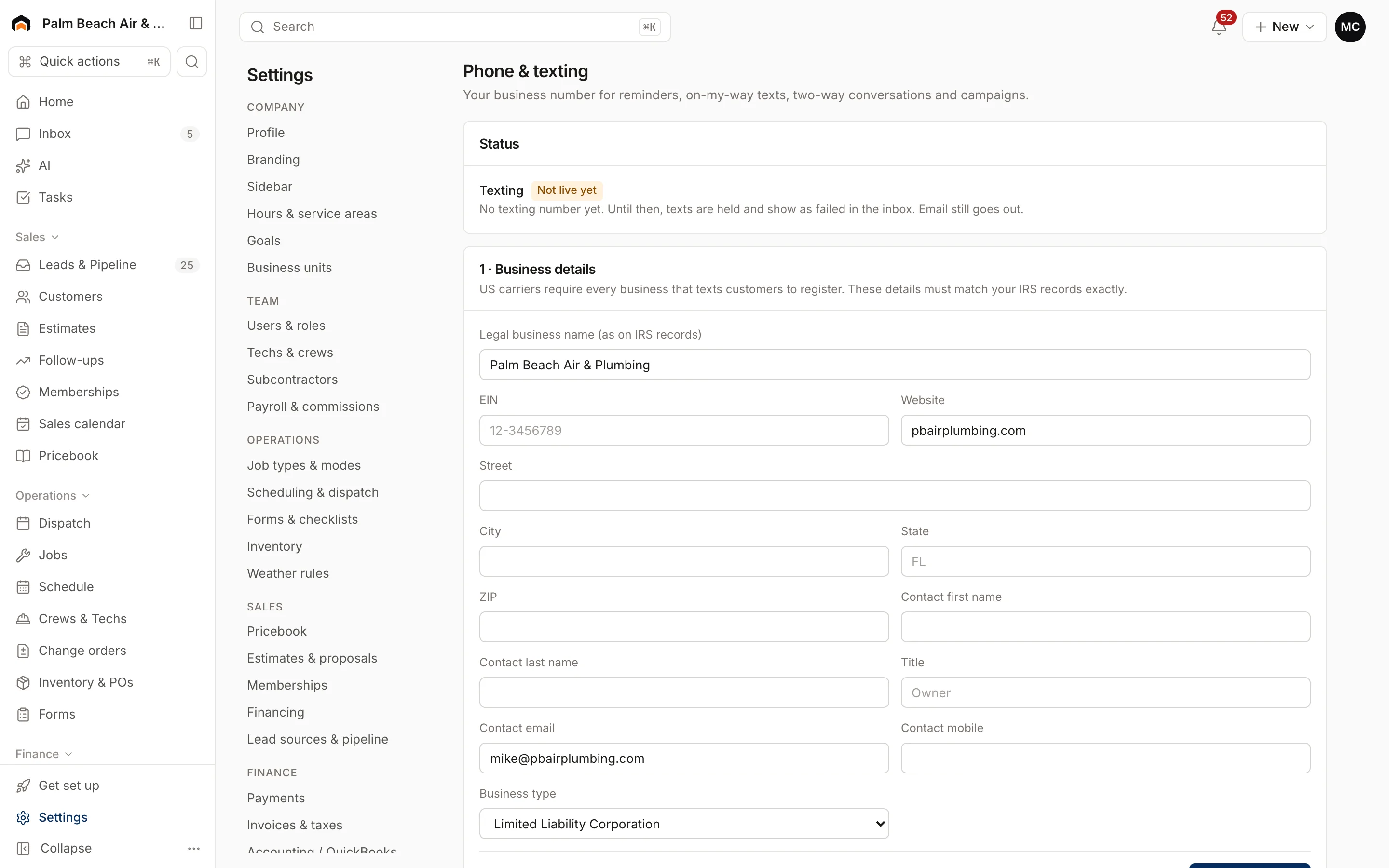
When Homeforce numbers are switched on, setup on that page takes three steps:
- Business details: your legal business name, EIN, address and a contact. US carriers require every business that texts customers to register, and these must match your IRS records exactly.
- Your texting number: search by Area code, choose Local or Toll-free, and click Get it.
- Carrier registration: your Brand (A2P 10DLC) and Campaign are filed with the carriers. A toll-free number can send while the local number's review finishes. Use Check status. Carrier review usually takes days, not minutes.
Call tracking
Settings → Call tracking lets you give each lead source its own number, so every call is credited to the ad that drove it. It needs a phone line first: a Homeforce number, or a connected phone system. Recorded calls with transcripts are also what Coach scores.
Opt-outs
The Opt-outs list on Settings → Phone & texting shows numbers that replied STOP. Homeforce won't text them again.
Was this helpful?
Related articles
Integrations
Connect Quo (OpenPhone)
Keep your Quo numbers and bring texts and calls into Homeforce's inbox and customer timelines.
Integrations
Browse and connect integrations
Find integrations on the Integrations page, see which are available now and which are coming soon, and connect one.
AI agents
Score calls and sales visits with Coach
Coach scores recorded calls and sales conversations, tracks booking and close rates, and gives each rep tips for next time.
Integrations
Manage a connection
Set up and run a connected integration, including mappings, sync rules, the activity log, Sync now, backfills and disconnecting.
Still stuck?
Our team answers support emails during business hours, usually within a few hours.