
API and webhooks
Create API keys, use Homeforce's REST API, and get signed webhooks when things happen in your account.
If you have a developer, or a website builder that can post data, Homeforce's API and webhooks let you connect almost anything. Owners and admins can manage them in Settings → Developers.
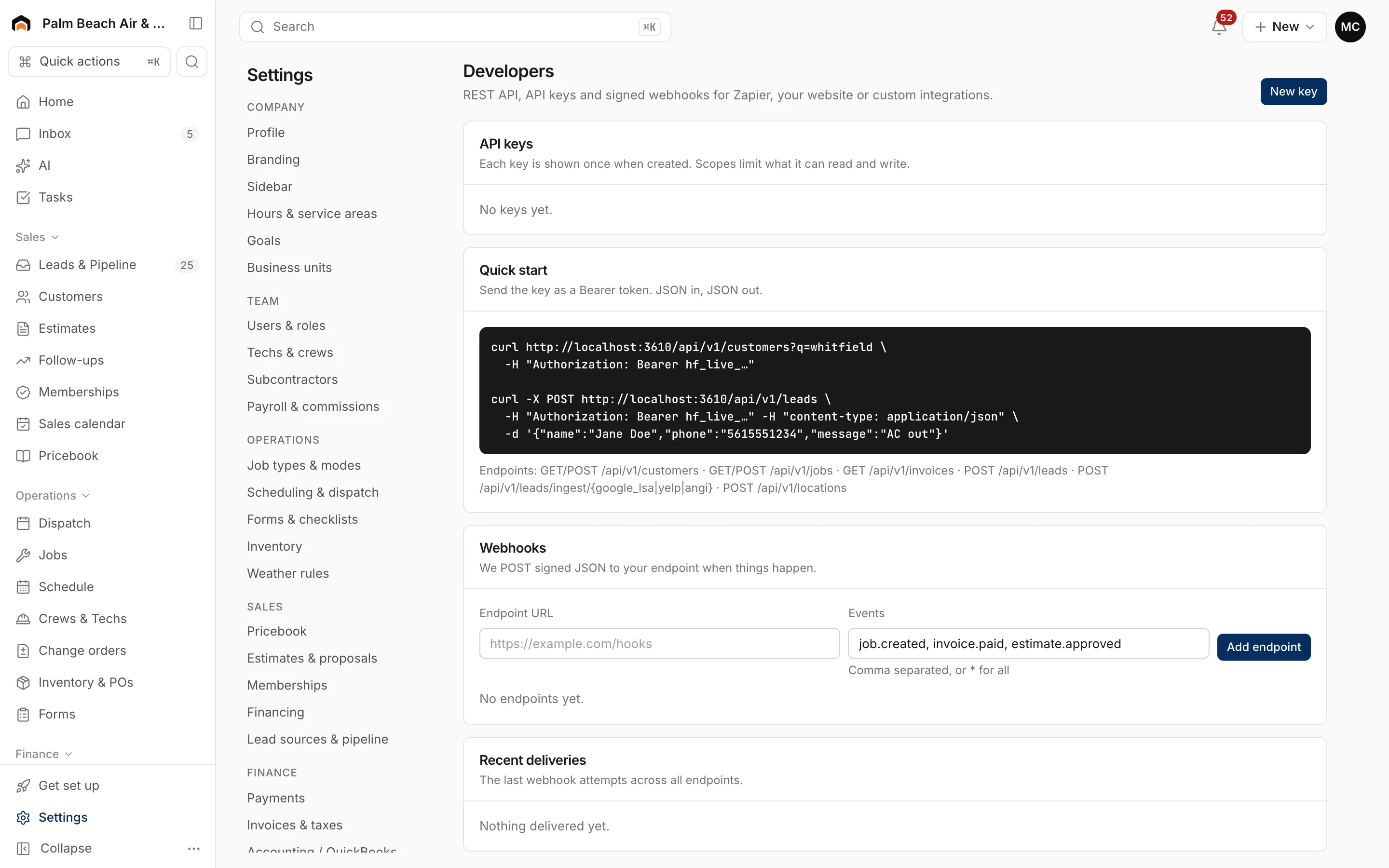
API keys
- Click New key.
- Give it a Name, like "Website form".
- Tick only the scopes it needs.
- Click Create key.
- Copy the key right away. It won't be shown again.
| Scope | Allows |
|---|---|
read:customers / write:customers |
Look up / create customers |
read:jobs / write:jobs |
Look up / create jobs |
read:invoices |
Look up invoices |
write:leads |
Create leads |
write:locations |
Send vehicle or tech locations |
manage:hooks |
Let Zapier or Make subscribe to events |
Each key shows when it was last used. Click Revoke to turn a key off. Anything using it stops working.
The API
Send the key as a Bearer token. JSON in, JSON out. Endpoints:
GET/POST /api/v1/customersGET/POST /api/v1/jobsGET /api/v1/invoicesPOST /api/v1/leadsPOST /api/v1/locations
The Quick start section on the page shows ready-to-copy examples with your account's address.
Webhooks
Webhooks tell another system when something happens in Homeforce.
- Enter your Endpoint URL.
- Under Events, list the events you want, separated by commas, like
job.created, invoice.paid, estimate.approved, or*for all. - Click Add endpoint.
- Click Send test to check it arrives.
Each delivery is signed. Your developer should check the Homeforce-Signature header against the endpoint's signing secret (an HMAC-SHA256 of the timestamp and body).
Recent deliveries shows the last attempts, with delivered, failed or pending status, the response code and number of attempts.
Was this helpful?
Related articles
Integrations
Zapier and Make
The status of the Zapier and Make integrations, and how to connect Homeforce to other apps today with webhooks or Flows.
Integrations
Lead source integrations
The status of Angi, Thumbtack, HomeAdvisor, Yelp, Meta lead ads and Google Local Services, and how to get leads into Homeforce today.
AI agents
Automate with Flows
Build "when this happens, do that" automations that text, email, tag, notify your team, send a webhook, or ask an AI agent.
Integrations
Browse and connect integrations
Find integrations on the Integrations page, see which are available now and which are coming soon, and connect one.
Still stuck?
Our team answers support emails during business hours, usually within a few hours.