
Track job costs and margin
Record costs on a job, compare a project's budget to actual spend, and see margin across your recent jobs on the Job costing page.
Job costing tells you whether a job made money. Homeforce collects costs on each job as you work, and compares them with what you're charging.
Where costs come from
- Cost entries you record on the job (materials, permits, rentals and so on).
- Parts used from your stock. See Parts and inventory on jobs.
- Approved sub bills. See Subcontractors on projects.
- Labor from the time your techs track on the job. Homeforce uses each person's pay rate plus your labor burden, or, if they have no pay rate, the Hourly cost set in Settings → Techs & crews.
- Commissions and payment fees tied to the job.
Record a cost
- Open the job and go to the Costs tab.
- Click + Cost.
- Pick the Type: material, labor, subcontractor, equipment rental, permit or other.
- Enter the Amount and Date.
- On projects, pick the Phase so it counts against that phase's budget.
- Enter a Description and, if you like, the Vendor.
- Click Save cost.
The entry appears under Cost entries, newest first.
Project budget vs actual
On projects, the Costs tab opens with four numbers:
- Contract: the contract amount plus approved change orders.
- Complete: overall percent complete.
- Cost vs budget: what you've spent and what share of the budget that is. It turns red when you've spent noticeably more of the budget than the job is complete.
- Projected margin: the contract minus the larger of the budget or actual cost, and its percentage.
Under Job costs you'll see totals by type, Total actual and Remaining budget. Each phase on the Phases tab shows Actual / budget too.
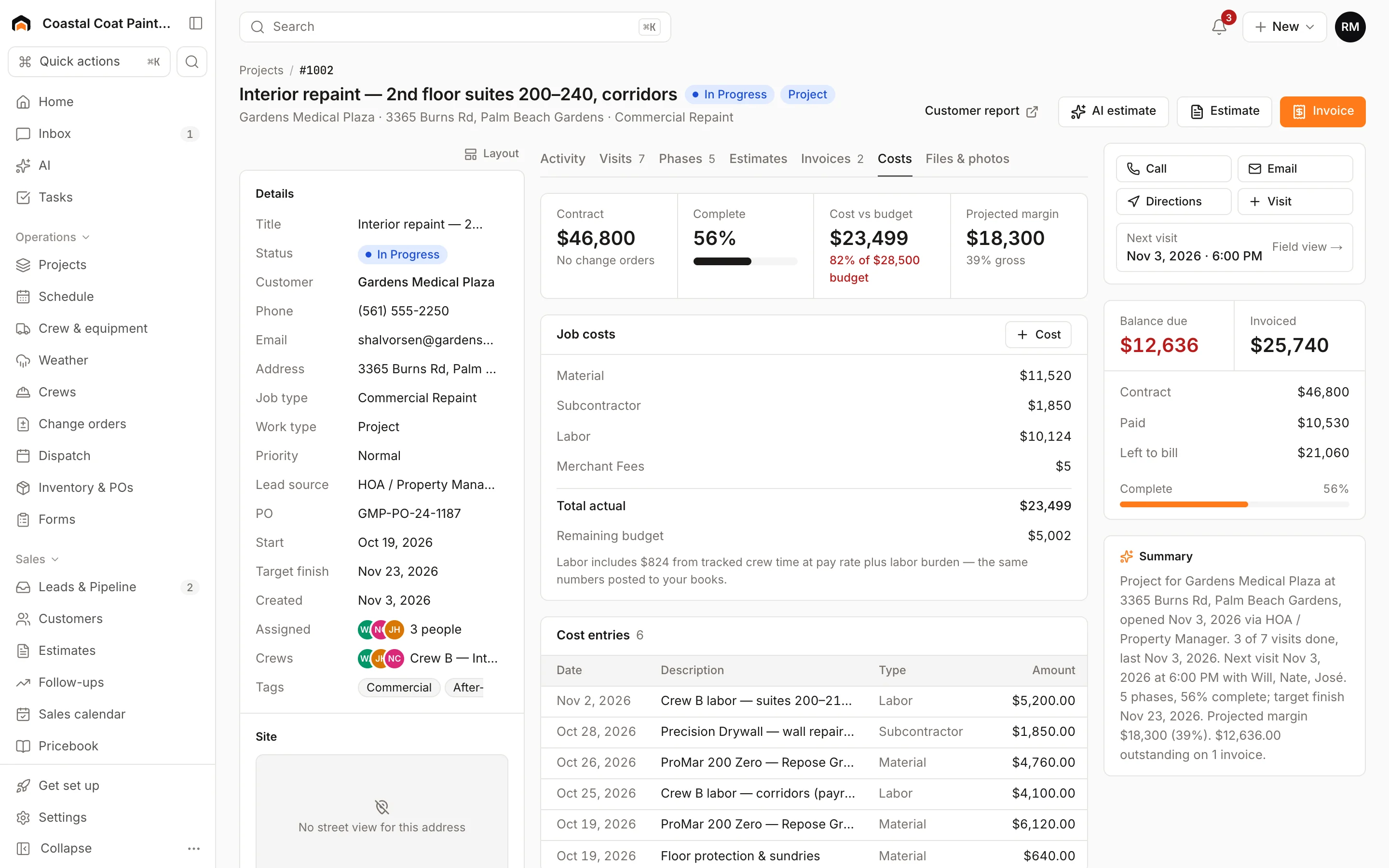
The Job costing page
Job costing under Finance in the sidebar lists your last 30 jobs that are in progress, completed or invoiced, with:
- Revenue: the contract (with change orders) for projects, or the total invoiced otherwise.
- Cost: everything above.
- Margin: shown in red under 20%, amber under 40%, and green above that.
The header totals revenue and gross margin across the list. Click a job to open it.
Was this helpful?
Related articles
Jobs and projects
Change orders
Price added or changed scope on a project, get the customer's signature, and roll it into the contract, budget and progress billing.
Jobs and projects
Subcontractors on projects
Keep your subs' insurance and W-9 on file, enter their bills against a project, and approve and pay them so the cost lands in job costing.
Jobs and projects
Parts and inventory on jobs
Record parts used from a truck or warehouse on a job, so stock goes down and the cost lands on the job.
Reports
Reports overview
See revenue, invoicing, average ticket, close rate, team performance and lead source ROI for any recent period.
Still stuck?
Our team answers support emails during business hours, usually within a few hours.