
Manage a project
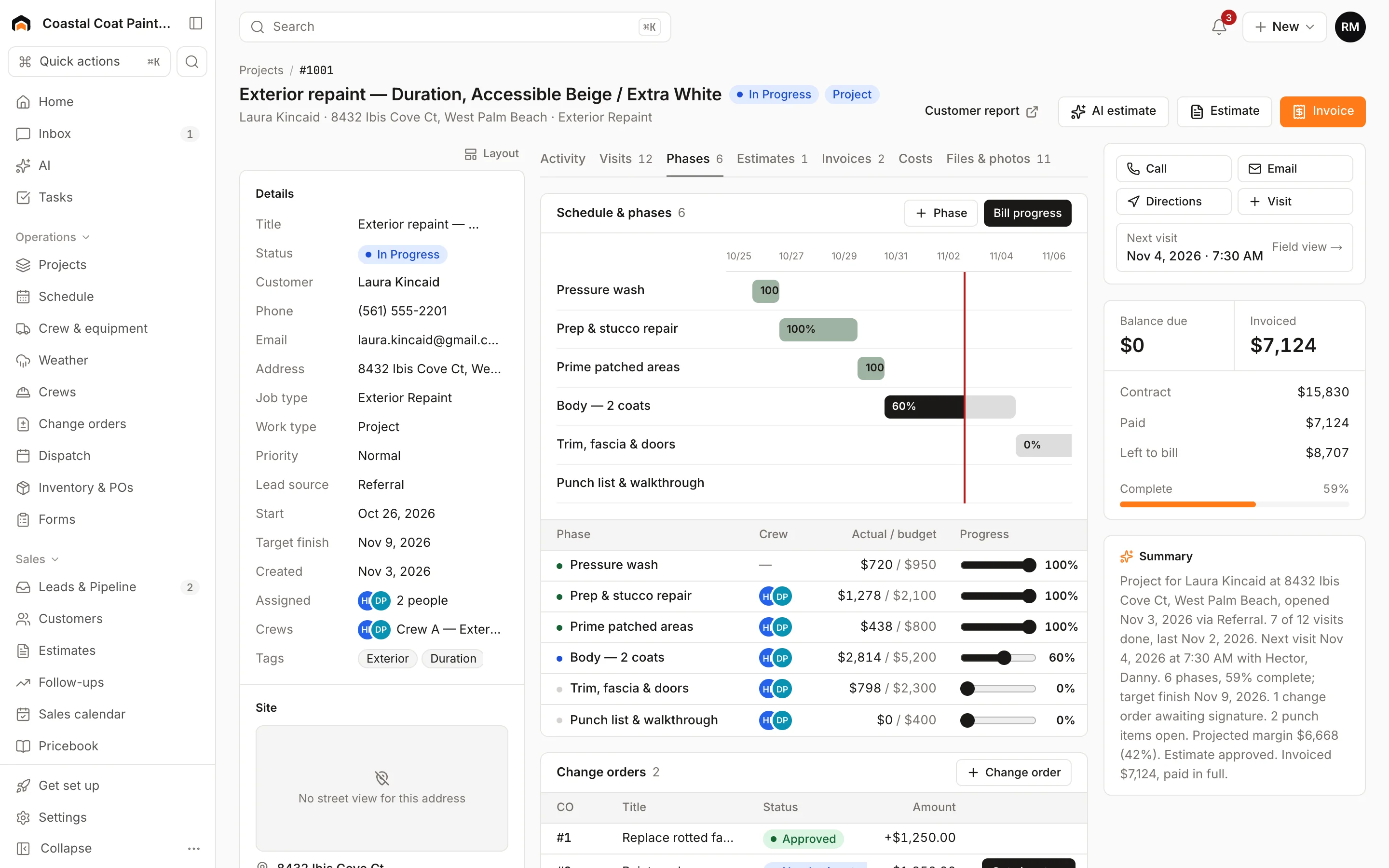
Break a project into phases, see them on a Gantt schedule, update percent complete, tie visits to phases, and bill progress.
A project is a job that runs over days or weeks. You manage it from the job's Phases tab, which holds the schedule, change orders, punch list and daily logs. Find your projects under Projects in the sidebar, or on the Jobs board, where project cards carry a Project tag.
Add phases
Phases are the stages of the work, like "Demo", "Prep" or "Prime & first coat".
- Open the project and go to the Phases tab.
- Under Schedule & phases, click + Phase.
- Enter a Name, Start and End dates, and a Budget for the phase.
- Click Add phase.
Phases are listed in the order you add them.
The Gantt schedule
Once phases have start and end dates, a Gantt chart appears above the list. Each bar spans the phase's dates and fills in with its percent complete. A red line marks today. The chart is for viewing; you don't drag bars.
Update progress
Each phase has a Progress slider in 5% steps. Drag it and let go to save.
- Above 0%, the phase shows as in progress.
- At 100%, it's marked completed.
The project's overall percent complete is weighted by phase budgets, so a $10,000 phase counts more than a $1,000 one. If no phases have budgets, it's a simple average.
People who can see costs also see Actual / budget for each phase, in red when it's over.
Schedule work in phases
Visits on a project work like any other. When you click Add visit on a project, pick the Phase so the work is grouped. Book crews for phase work from the crew board. See Schedule crews and equipment.
Bill progress
Click Bill progress under Schedule & phases to create a draft progress invoice for the work completed since your last bill. It uses the contract amount plus approved change orders, holds back any retainage, and credits deposits already paid. You'll need a contract amount on the project first. See Progress billing.
Customer report
Click Customer report at the top of the project to open a progress page you can share with the customer. It shows each phase's percent complete, photos by phase, and your daily logs. See Daily logs, punch lists and progress reports.
Was this helpful?
Related articles
Jobs and projects
Jobs, visits and projects
How Homeforce organizes work - a job holds one or more visits, and a project is a job with phases, a budget and change orders.
Jobs and projects
Change orders
Price added or changed scope on a project, get the customer's signature, and roll it into the contract, budget and progress billing.
Jobs and projects
Daily logs, punch lists and progress reports
Record what happened on site each day, track the punch list to the finish, and share a progress report and photo timeline with the customer.
Invoices and payments
Bill a project in progress
Invoice a project by percent complete, with approved change orders, deposit credits and retainage handled for you.
Still stuck?
Our team answers support emails during business hours, usually within a few hours.