
Bill a project in progress
Invoice a project by percent complete, with approved change orders, deposit credits and retainage handled for you.
Progress billing lets you invoice a long project in stages as the work gets done, instead of all at the end. Each progress invoice bills the share of the contract you've earned since the last one.
Progress billing is part of projects, which are included on the Scale plan. Owners, admins, project managers and accounting users can bill progress.
Before you bill
- Make the job a project with a contract amount. On the job, click Convert to project and fill in the Contract amount. See Jobs vs. projects.
- Add phases with budgets. In Schedule & phases, click Phase and enter a name, dates and a Budget.
- Update progress. Drag each phase's Progress slider as work gets done (in 5% steps).
Homeforce works out the project's overall percent complete from the phases, weighting each one by its budget. A $20,000 phase at 50% counts for more than a $2,000 phase at 50%. If no phase has a budget, the phases count equally.
Bill progress
- Open the project.
- In Schedule & phases, click Bill progress.
- Homeforce creates a draft progress invoice and opens it.
- Review it, then click Send.
If percent complete hasn't gone up since the last progress invoice, you'll see "Nothing new to bill".
How the amount is calculated
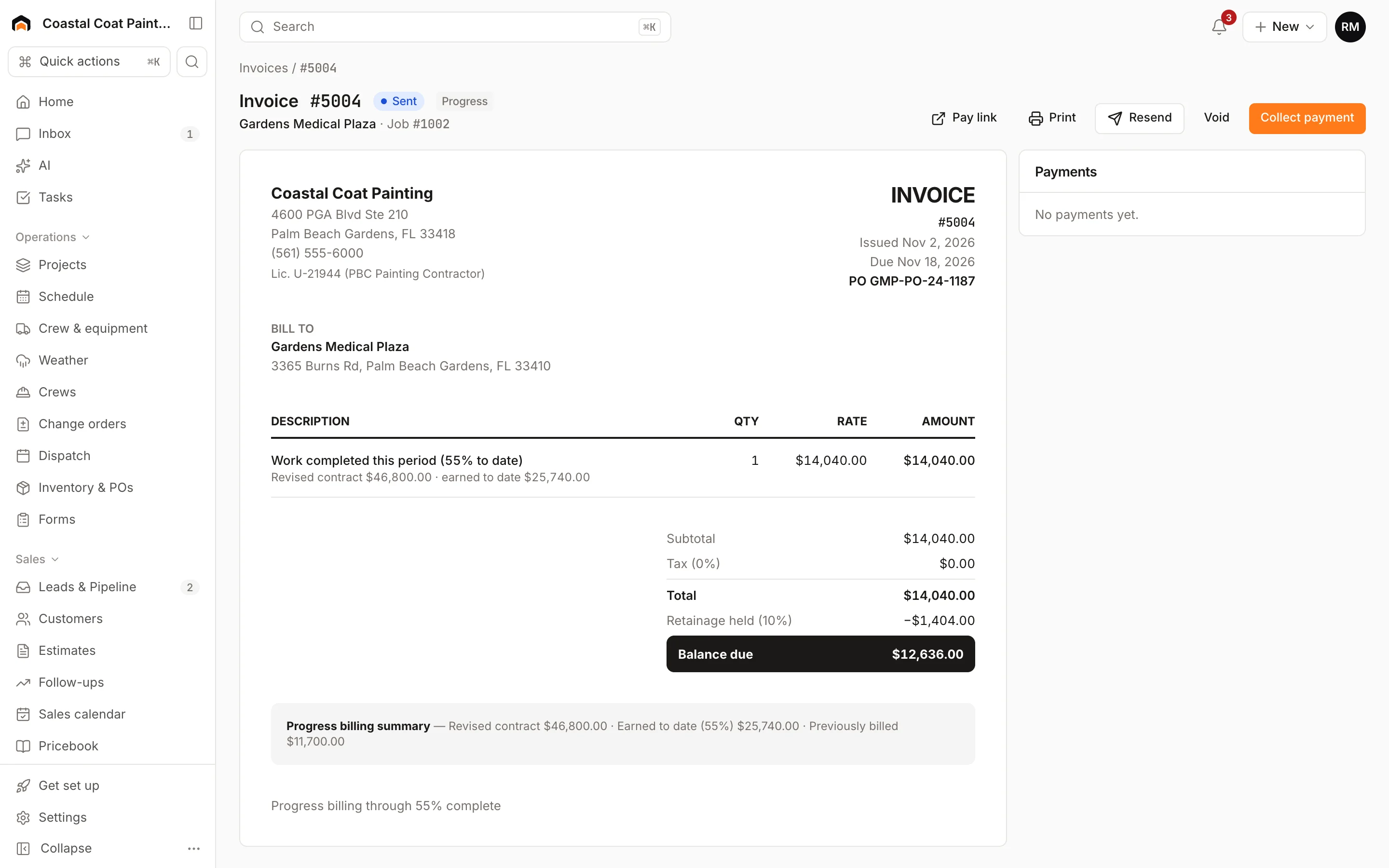
- Revised contract = contract amount + approved change orders.
- Earned to date = revised contract × percent complete.
- This period = earned to date − everything billed on earlier progress invoices.
The invoice has one line, "Work completed this period (X% to date)". A Progress billing summary under the totals shows the revised contract, earned to date and previously billed. When percent complete reaches 100%, the invoice is marked as the final invoice.
Progress invoices aren't taxed.
Deposits
If the customer paid a deposit on the project's estimate, Homeforce credits it on the next progress invoice as Deposit applied, up to that invoice's amount. Any deposit left over carries to the next progress invoice.
Retainage
Retainage is a percentage the customer holds back from each payment until the project is closed out. When a project carries a retainage percentage, each progress invoice shows Retainage held (X%) and subtracts it from the balance due. The Invoices page shows the total Retainage held on open invoices.
Voiding a progress invoice
If you void a progress invoice, it no longer counts as previously billed, so the next Bill progress picks that amount back up.
Was this helpful?
Related articles
Jobs and projects
Jobs, visits and projects
How Homeforce organizes work - a job holds one or more visits, and a project is a job with phases, a budget and change orders.
Jobs and projects
Change orders
Price added or changed scope on a project, get the customer's signature, and roll it into the contract, budget and progress billing.
Invoices and payments
Collect a deposit
Require a deposit on an estimate, collect it when the customer approves, and have it credited on the final invoice.
Invoices and payments
Create and send an invoice
Build an invoice from your pricebook, save it as a draft or send it with a pay link by text and email.
Still stuck?
Our team answers support emails during business hours, usually within a few hours.