
Get paid with pay links
What a pay link is, what your customer sees when they open it, and how to share one.
A pay link is a secure web page where your customer can see an invoice and pay it by card or bank, from any phone or computer. No login or app is needed.
How customers get a pay link
- When you send an invoice, the text and email include the pay link.
- When a membership bill can't be charged to a card on file, the invoice goes out with its pay link.
- When a customer approves an estimate with a deposit, they get a button to pay the deposit right away.
- From their customer portal, every unpaid invoice has a Pay button. See Use the customer portal.
To share a link yourself, open the invoice and click Pay link. The page opens in a new tab; copy the address from your browser and paste it into a text or email.
Pay links work for 90 days. After that, send the invoice again (Resend) to send a fresh link.
What the customer sees
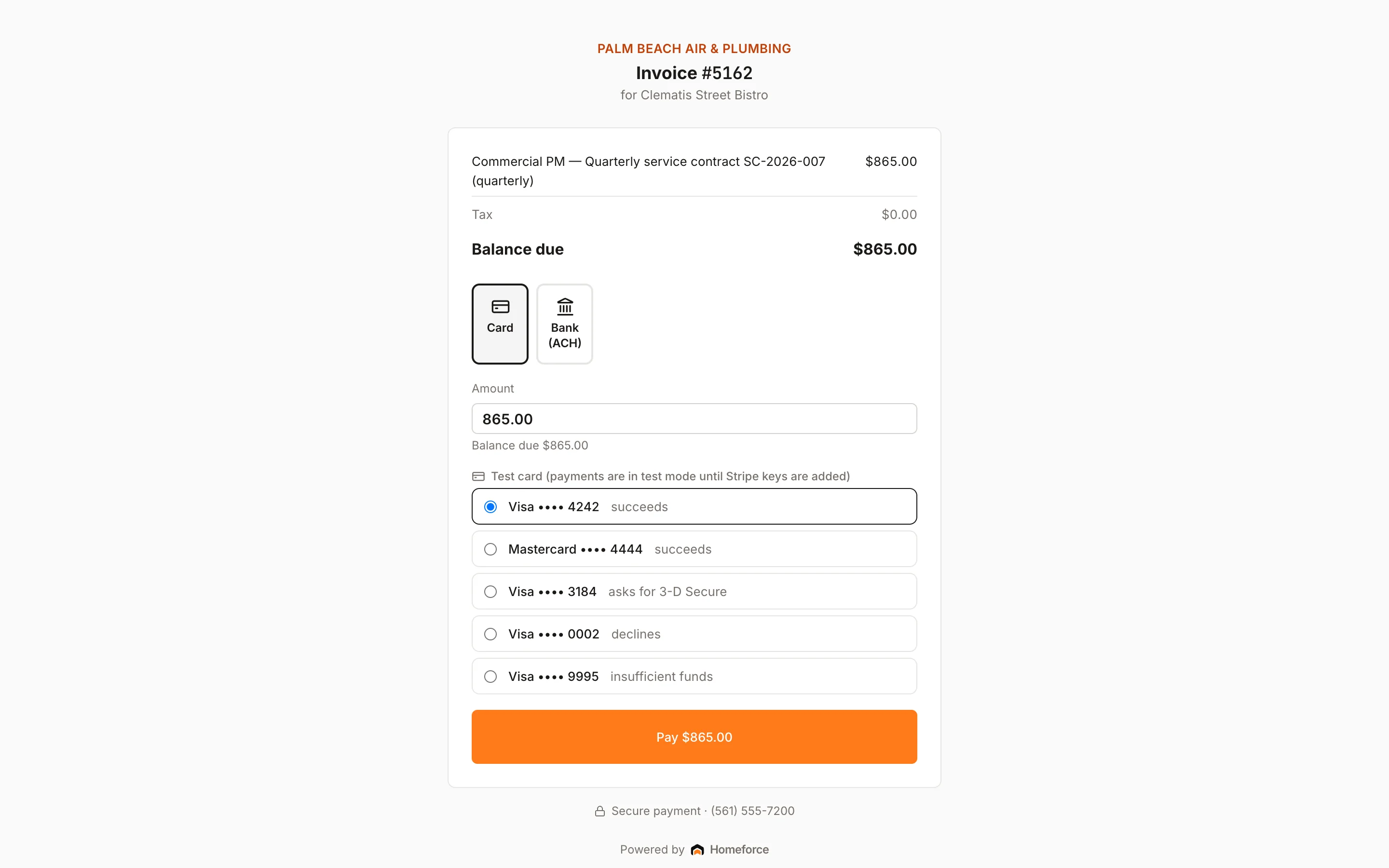
The page leads with your company logo or name, then:
- The invoice number and the customer's name.
- Each line with its amount, then tax.
- Any Deposit applied, Retainage held and amounts already Paid.
- The Balance due.
- Payment options: Card or Bank (ACH).
- Your payment terms, warranty and footer, if you've set them in Settings → Contract terms & documents.
- Your phone number, with "Secure payment".
The customer can change the amount to pay part of the balance. When they pay, they see a confirmation and get an emailed receipt. Once the balance is zero, the page says "Paid in full — thank you!"
Bank payments show as processing until they clear, usually 3–5 business days.
What customers can't do on a pay link
- Pay with cash, check, or a card reader. Those are for your team in person.
- Save a card for later.
- Pay more than the balance due.
For security, a pay link only ever pays its own invoice, and Homeforce limits how many payment attempts can be made from one link in a short time.
Where the money goes
Pay link payments go to your Stripe account like any other card or bank payment, and show under Recent payments on the Payments page. See Get paid out.
Was this helpful?
Related articles
Invoices and payments
Create and send an invoice
Build an invoice from your pricebook, save it as a draft or send it with a pay link by text and email.
Invoices and payments
Use the customer portal
Give customers one link to see their balance, pay invoices, review estimates, check appointments and manage their membership.
Invoices and payments
Collect a payment
Take card, card-on-file, card reader, bank, cash or check payments on an invoice, including partial payments.
Invoices and payments
Follow up on unpaid invoices
Find past-due invoices, resend pay links, and work your collections list.
Still stuck?
Our team answers support emails during business hours, usually within a few hours.