
Refund a payment or void an invoice
Give money back in full or in part, or cancel an invoice that shouldn't be paid.
Refunds send money back to the customer. Voiding cancels an invoice so it no longer counts as owed. Owners, admins and accounting users can do both. See Users and permissions.
Refund a payment
- Open the invoice.
- Under Payments on the right, find the payment and click Refund.
- Enter the Amount. It starts at the full amount that hasn't been refunded yet. Lower it for a partial refund.
- Enter a Reason (for example, "Part not installed").
- Click Refund.
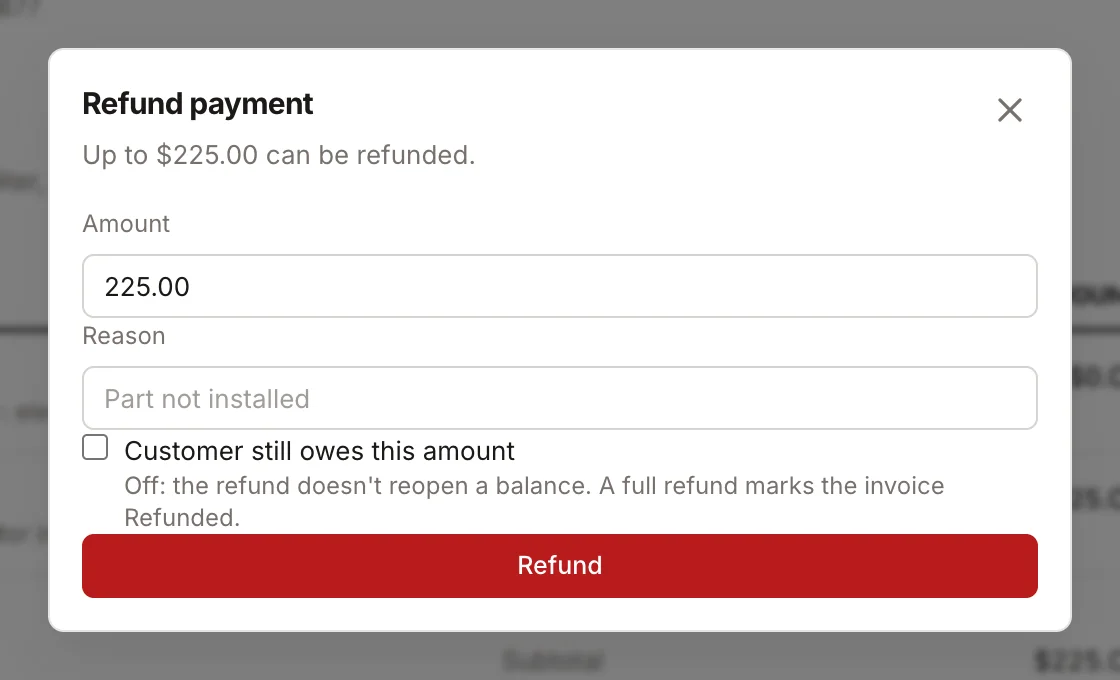
What happens:
- Card and bank payments are refunded to the customer's card or bank account through Stripe. If Stripe can't process it, you'll see "Refund failed at the processor" and nothing changes.
- Cash and check payments are recorded as refunded in Homeforce only. Hand the customer their money back yourself.
- The payment shows "Refunded $X — reason" underneath it, and its status changes to Partially refunded or Refunded.
- After a partial refund, the invoice balance goes back up by the refunded amount and a paid invoice moves back to Partial.
- If every payment on the invoice is refunded in full, the invoice is marked Refunded. It no longer shows as unpaid, and the customer isn't asked to pay it.
You can refund a payment more than once, up to its original amount.
Void an invoice
Void an invoice when it was created by mistake or the work won't be billed.
- Open the invoice.
- Click Void.
- Confirm.
The invoice is marked Void, its balance drops to zero, and it no longer counts in outstanding totals or reports. Voided invoices don't appear in the customer portal.
You can only void an invoice that has no payments on it. If the customer already paid, refund the payments first, then void.
Disputes
If a customer disputes a card charge with their bank, Homeforce records it on the payment's history. Respond to the dispute from your Stripe Dashboard.
Was this helpful?
Related articles
Invoices and payments
Collect a payment
Take card, card-on-file, card reader, bank, cash or check payments on an invoice, including partial payments.
Invoices and payments
Create and send an invoice
Build an invoice from your pricebook, save it as a draft or send it with a pay link by text and email.
Settings
Users and permissions
Invite people, change their role, limit sales reps to their own pipeline, and deactivate someone who leaves.
Invoices and payments
Set up online payments and invoice defaults
Connect Stripe so customers can pay by card or bank, and set your sales tax, due dates and invoice terms.
Still stuck?
Our team answers support emails during business hours, usually within a few hours.