
Take payments with a card reader
Register a Stripe card reader and use it to take tap, chip or swipe payments in person.
A card reader lets your customer tap, insert or swipe their card in person. In-person card payments are charged at a lower rate than typed-in cards: 2.7% + 5¢.
Register a reader
Owners and admins can register readers.
- In the sidebar, click Payments.
- Scroll to Card readers.
- Enter a Label your team will recognize (for example, "Truck 12 reader").
- Enter the Pairing code shown on the reader's screen.
- Under Assigned to, pick the tech, salesperson or project manager who carries it, or leave it Shared.
- Click Register reader.
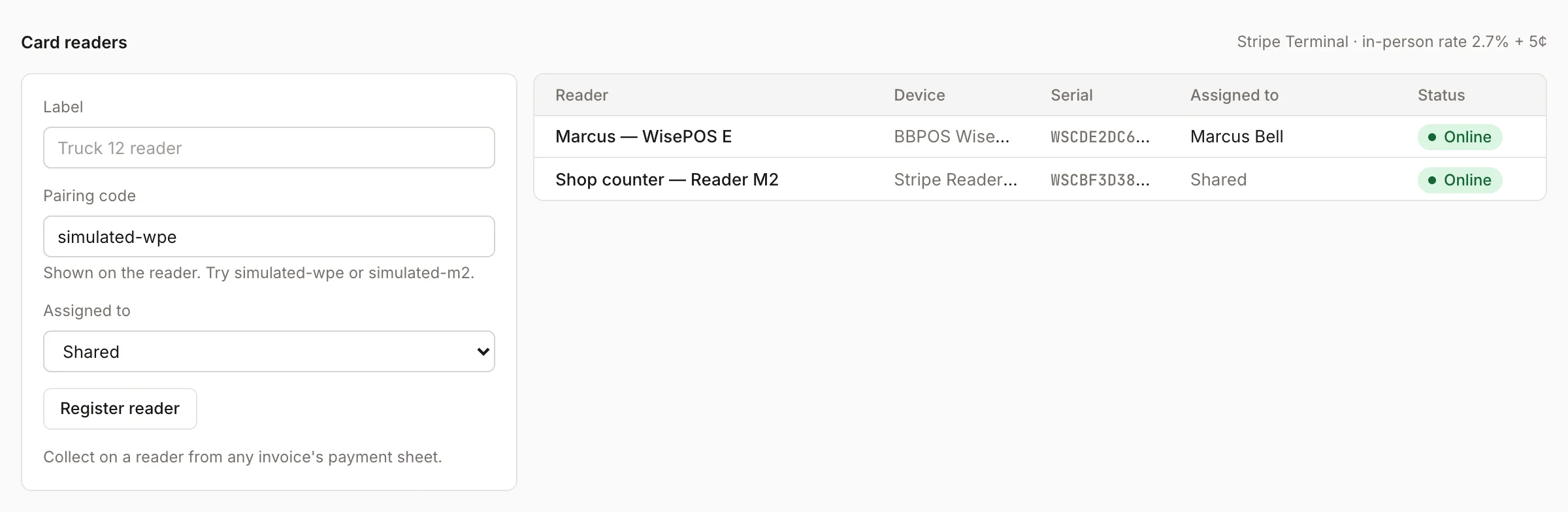
The reader appears in the list with its device type, serial number, who it's assigned to and its status.
Take a payment on a reader
- Open the invoice and click Collect payment.
- Choose Card reader.
- Pick the Reader if you have more than one.
- Check the Amount.
- Click Charge.
Homeforce sends the amount to the reader and shows "Amount sent to reader — customer taps, inserts or swipes…". When the customer pays, the payment is recorded on the invoice with the card brand and last four digits.
The reader has to be online. If it isn't, you'll see "Card reader is offline". Check that it's on and connected, then try again.
Card readers only show up for your team. Customers paying from a pay link can't use them.
No reader?
Techs can still take card payments by choosing Card and typing in the card details, or charge a Card on file. See Collect a payment.
Was this helpful?
Related articles
Invoices and payments
Collect a payment
Take card, card-on-file, card reader, bank, cash or check payments on an invoice, including partial payments.
Invoices and payments
Get paid out
See your available balance, send money to your bank, and choose standard or instant payouts.
Mobile app
Get the mobile app and sign in
Install the Homeforce app on your iPhone or Android phone, accept your team invite, and sign in with a code, password or Google.
Invoices and payments
Set up online payments and invoice defaults
Connect Stripe so customers can pay by card or bank, and set your sales tax, due dates and invoice terms.
Still stuck?
Our team answers support emails during business hours, usually within a few hours.