
Send an estimate for online approval
Text and email the estimate link so the customer can review options, sign and pay a deposit from their phone.
When the customer isn't in front of you, send the estimate. They get a link to a page where they can compare options, pick one, sign and pay a deposit.
Send it
- Open the estimate and make sure every option has at least one line item. You can't send an empty estimate.
- Click Save changes if you've edited anything.
- Click Send.
The estimate moves to Sent. The customer gets a text and an email with the link, using the Estimate sent message in Settings → Automated messages. The default follow-up sequence also starts. See Follow up with the sales pipeline.
To send it again after changes, click Resend.
The customer's estimate page
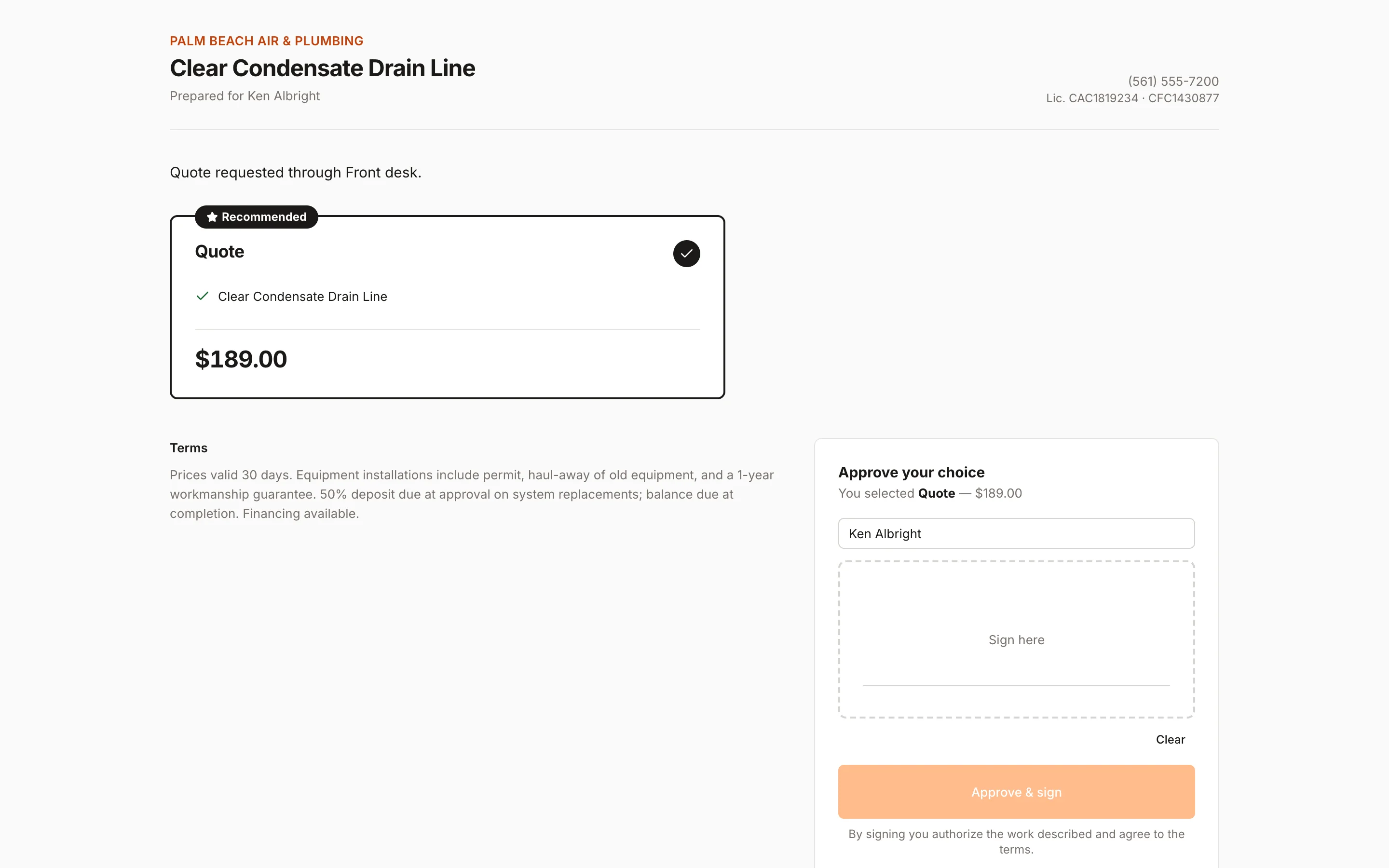
The link opens a page branded with your logo. It looks just like present mode: options side by side, totals, discounts, a financing estimate on larger options, your terms, and an Approve your choice box.
To approve, the customer:
- Taps an option.
- Types their full name and signs with a finger or mouse.
- Taps Approve & sign.
If there's a deposit, a Pay … deposit button appears as soon as they've signed.
The page never shows your costs or margins.
Viewed status
The first time the link is opened, the estimate moves from Sent to Viewed, and it shows up as Viewed — hot on the Sales pipeline.
Links expire
Estimate links work for 60 days. After that the customer sees a message asking them to contact you, and you can click Resend to send a fresh link.
If they say no
Customers can't decline from the link. If they tell you they're passing, open the estimate and click Mark declined. That stops the follow-ups and moves it to Lost on the pipeline.
Change a sent estimate
You can keep editing a sent estimate until it's approved. Save, then Resend so the customer knows to look again.
Was this helpful?
Related articles
Sales
Create an estimate
Start an estimate for a customer, add line items from your pricebook, and save it ready to present or send.
Sales
Follow up with the sales pipeline
Track every estimate from building to won or lost, run automatic follow-ups, and see upcoming sales appointments.
Sales
After an estimate is sold
What happens when a customer approves, how deposits work, and how to schedule and invoice the sold work.
Sales
Present an estimate
Walk the customer through their options on a tablet or laptop, then have them choose, sign and pay the deposit on the spot.
Still stuck?
Our team answers support emails during business hours, usually within a few hours.