
Work a deal on the project page
Everything about one deal in one place: its stage, score, proposals, colors or selections, appointments and every text, call and note.
Every card on the Sales Pipeline opens a project page: the home for one deal from first call to signed proposal. Click a card to open it.
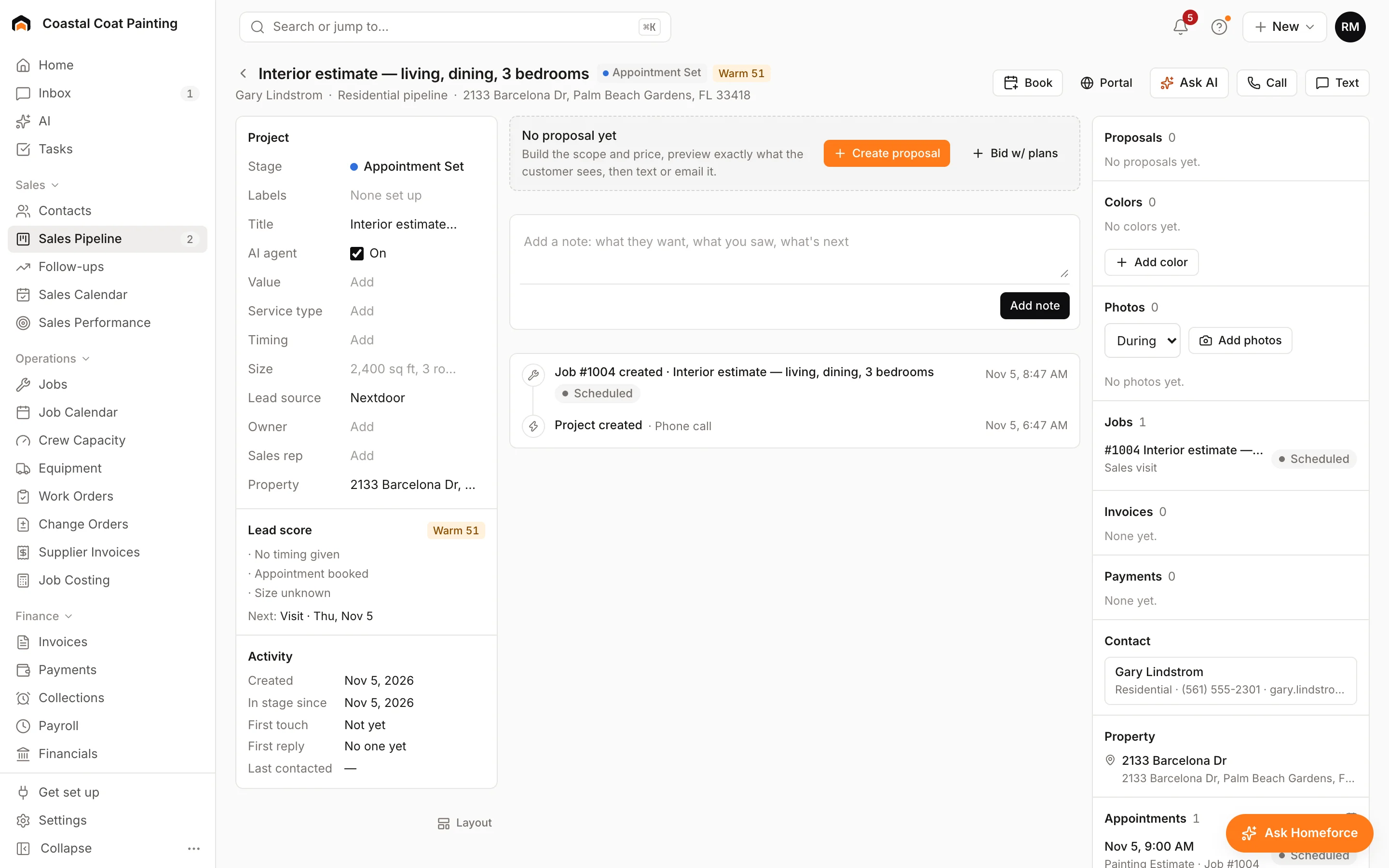
The header
The title is the service the customer asked for. Under it are the contact, the pipeline and the address. Next to the title you'll see the stage, the value, the lead score and any labels. Won appears once a proposal on the project is signed.
The buttons on the right let you act straight away: Book an appointment, open the customer's Portal, Ask AI, Call or Text.
Project details
The left column holds the deal's fields. Change Stage to move the deal along the pipeline; picking a won or lost stage closes it. You can also set Labels, Value, Service type, Timing, Size, Lead source, Owner and Sales rep.
AI agent is on for most projects, so the lead agent can text and reply to the customer. Switch it off when you want to take the conversation over yourself. Manual texts and emails still go out.
Below that, Lead score explains the score and the next step. Form answers shows what the customer filled in on a web form. Activity shows when they first heard from you and when you last talked.
Proposals and the timeline
Until there's a proposal, the middle column offers Create proposal or Bid w/ plans (let the estimating agent draft it from plans or photos). After that, the latest proposal sits at the top with Build or Open.
Add a note in the box below it. The timeline lists everything on the project, newest first: texts, emails, calls, notes, stage changes, proposals, appointments and payments.
The right rail
- Proposals: every version, with its status and total. Use + for another.
- Colors (painting) or Selections (other trades): the products or colors for each area. Add them, then Send for the customer to approve in their portal.
- Photos, Jobs, Invoices, Payments, Contact, Property and Appointments.
Was this helpful?
Related articles
Sales
Follow up with the sales pipeline
Track every estimate from building to won or lost, run automatic follow-ups, and see upcoming sales appointments.
Sales
Build a proposal
Price a job area by area from its measurements, offer Good, Better and Best, and send a proposal the customer can sign online.
AI agents
Draft a proposal with the estimating agent
Upload plans or photos and let the estimating agent measure the work and draft priced lines from your own rates, then confirm each line before sending.
Invoices and payments
Use the customer portal
Give each customer one branded link for their proposals, colors or selections, invoices, documents, photos, appointments and messages.
Still stuck?
Our team answers support emails during business hours, usually within a few hours.