
Plan and billing
See your Homeforce plan and tech seats, upgrade or downgrade, switch to annual billing, and update your card or cancel.
Settings → Plan & billing covers your Homeforce subscription. Everyone with settings access can view it, but only the account owner can change the plan or billing details.
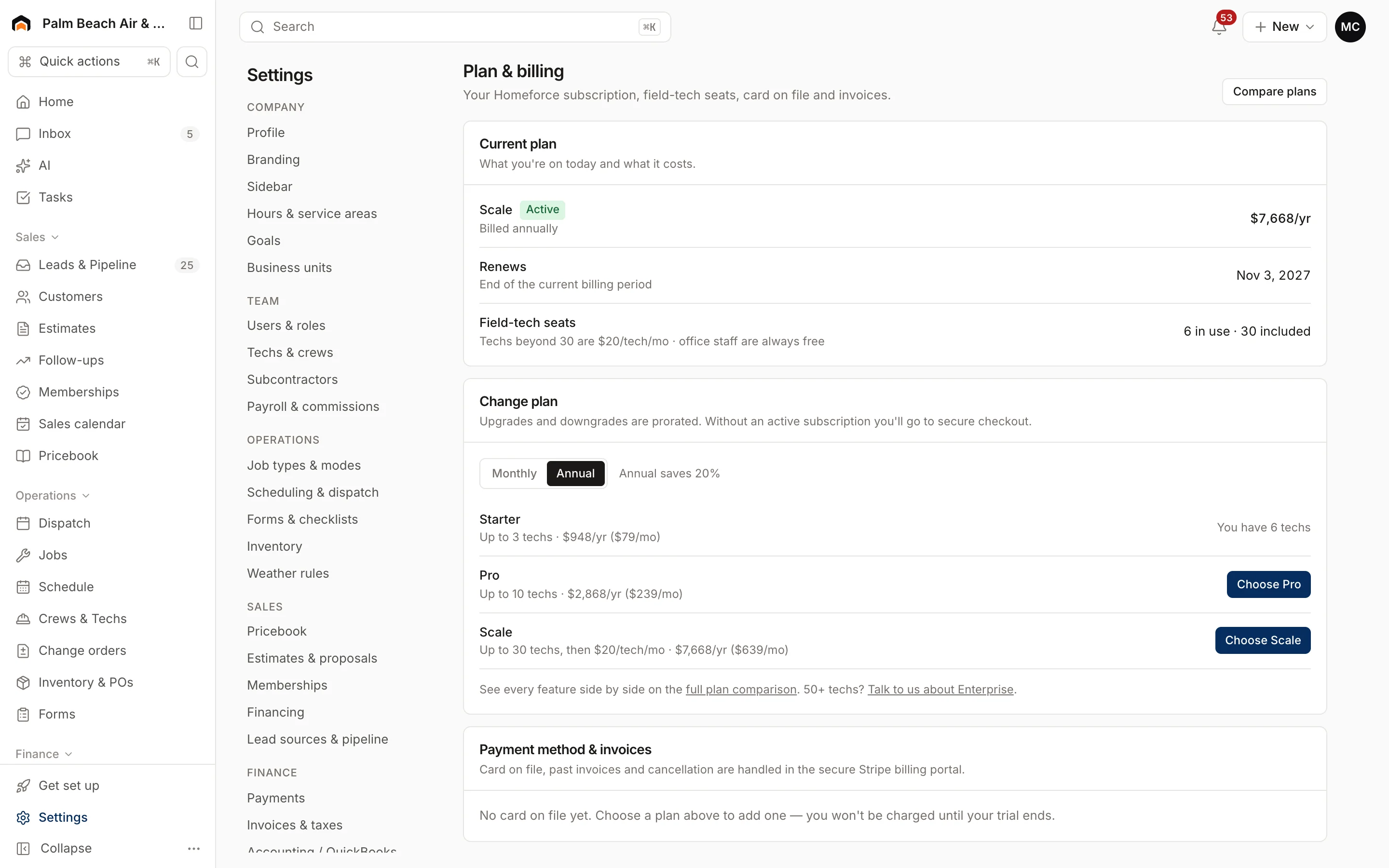
Your current plan
Current plan shows:
- The plan name and status: Free trial, Active, Past due, Canceled, Unpaid or Incomplete.
- What it costs and whether you're billed monthly or annually.
- Trial days left, or the date it renews or ends.
- Field-tech seats: how many techs you have and how many the plan includes.
Office staff are always free. Only field techs count toward your seats.
The plans
| Plan | Field techs |
|---|---|
| Starter | Up to 3 |
| Pro | Up to 10 |
| Scale | 30 included, then a per-tech add-on |
Pro adds features like memberships, good / better / best options, call tracking, campaigns and route optimization. Scale adds projects, inventory, commissions, custom dashboards and API access. Click Compare plans to see every feature side by side. Annual billing saves 20%.
Choose or change your plan
- Pick Monthly or Annual.
- Click Choose …, Upgrade to … or Downgrade to … next to a plan.
- If you don't have a subscription yet, you go to secure checkout. Otherwise, confirm the change.
Upgrades and downgrades are prorated on your next invoice. If you have more techs than a plan allows, it shows how many you have instead of a button. Choosing a plan during the trial keeps the rest of your trial free.
To switch billing period on your current plan, click Switch to annual or Switch to monthly.
Update your card, get invoices, or cancel
Click Manage billing to open the secure Stripe billing portal. There you can update your card, download invoices and receipts, or cancel. If you cancel, you keep access until the end of the current period, and you can keep the subscription from the portal before then.
If a payment fails
A red banner appears across the app. Stripe retries over the next few days. Update your card with Manage billing to avoid an interruption.
Over 50 techs? Contact sales about Enterprise from the link on this page.
Was this helpful?
Related articles
Getting started
Sign up and start your free trial
Create your Homeforce account, add a card for the 14-day trial, or join the waitlist if signups are closed.
Settings
Users and permissions
Invite people, change their role, limit sales reps to their own pipeline, and deactivate someone who leaves.
Settings
Turn on Labs features
Try new Homeforce features early, like AI agents, Flows and custom dashboards.
Settings
Company profile and branding
Set your company name, trades, license number, contact details, time zone, logo and your own profile photo.
Still stuck?
Our team answers support emails during business hours, usually within a few hours.