
Security and the audit log
Limit who can join your team by email domain, sign someone out of every device, and see a record of every change.
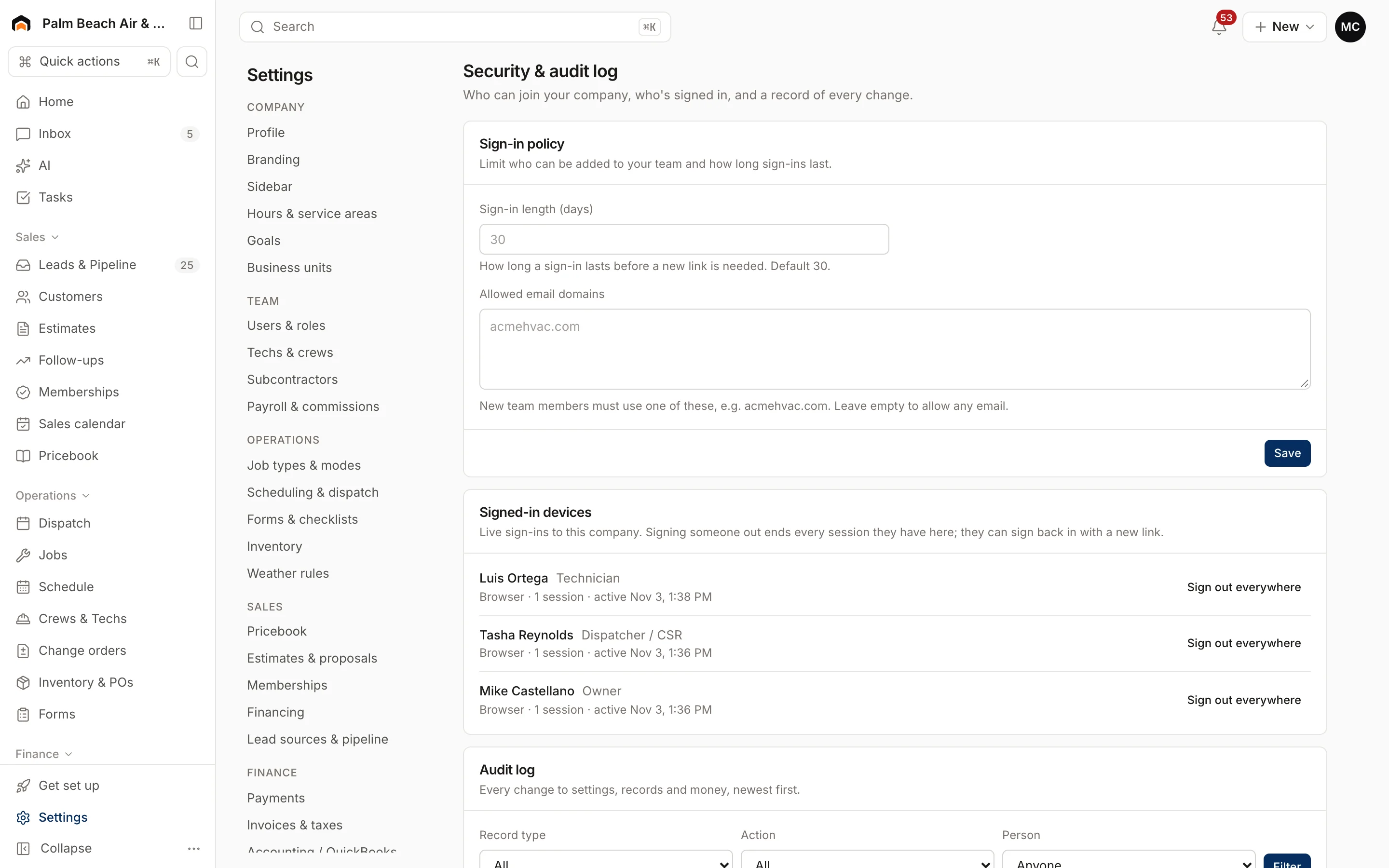
Settings → Security & audit log has three parts. What you see depends on your role.
Sign-in policy
Owners and admins can set:
- Sign-in length (days): how long a sign-in lasts, from 1 to 365 days. The default is 30.
- Allowed email domains: for example, acmehvac.com. When set, new team members must use an email at one of these domains, and invites to other addresses are refused. Leave it empty to allow any email.
Click Save. Other roles see the current policy but can't change it.
Signed-in devices
Only the owner sees this section. It lists everyone signed in to your company, their devices (for example "Chrome on macOS" or "Homeforce mobile app") and when they were last active.
To end someone's access on every device, such as when a phone is lost:
- Find the person.
- Click Sign out everywhere.
- Confirm.
They can sign back in with a new link. To remove someone permanently, deactivate them instead. See Users and permissions.
Audit log
Owners, admins and accounting users see the Audit log, a record of every change to settings, records and money, newest first. Each row shows when, who, the type of record and action, and what changed.
To narrow it down:
- Pick a Record type, an Action or a Person.
- Click Filter.
Click Clear to reset, and Older or Newer to page through.
Good habits
- Deactivate people the day they leave.
- Use Sign out everywhere if a device goes missing.
- Set an allowed email domain if everyone on your team has a company email.
Was this helpful?
Related articles
Settings
Users and permissions
Invite people, change their role, limit sales reps to their own pipeline, and deactivate someone who leaves.
Getting started
Log in to Homeforce
Sign in with your password, with Google, or with a one-time sign-in link sent to your email.
Getting started
Roles at a glance
What owners, admins, dispatchers, sales reps, project managers, accounting, techs and subcontractors can see and do.
Settings
Company profile and branding
Set your company name, trades, license number, contact details, time zone, logo and your own profile photo.
Still stuck?
Our team answers support emails during business hours, usually within a few hours.