
Payroll and commissions
Set each person's hourly cost and commission plan, build commission plans, and connect Gusto or Check for payroll.
Settings → Payroll & commissions sets labor costs and commission rules, and where approved hours go when you run payroll. Owners and admins can change pay rates and plans.
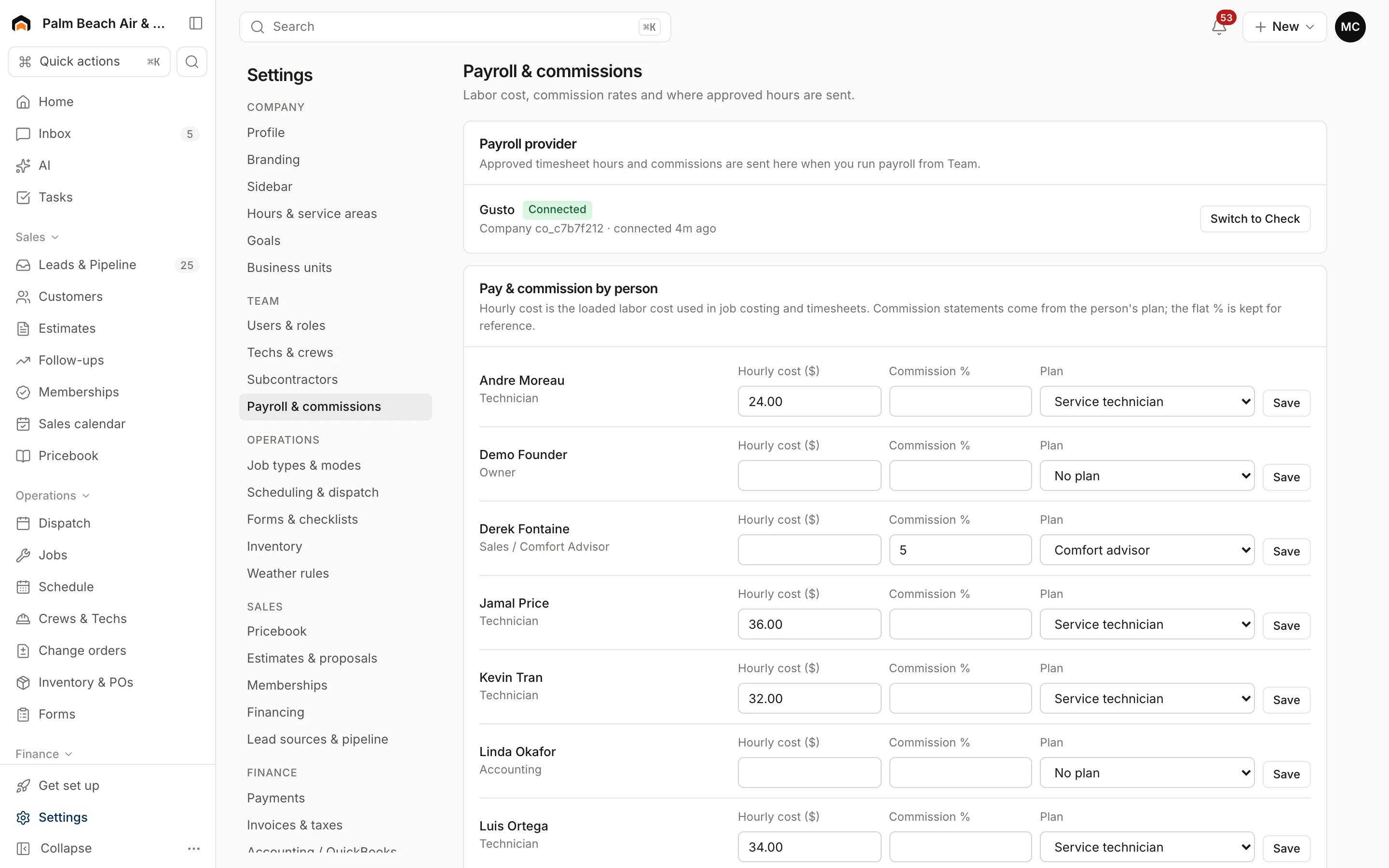
Payroll provider
Under Payroll provider, click Connect Gusto or Connect Check. Once connected, approved timesheet hours and commissions are sent there when you run payroll from the Timesheets & Payroll page. To change providers, click Switch to … and confirm.
Pay and commission by person
Each active team member has a row:
- Hourly cost ($): their loaded labor cost. Job costing and timesheets use it.
- Commission %: a flat rate kept for reference.
- Plan: the commission plan their statements are calculated from.
Change a row and click Save.
Create a commission plan
- Under New commission plan, enter a Plan name, like "Comfort advisors".
- Fill in any of the rates:
- % of sold estimates
- % of paid job revenue
- $ per membership sold
- Check the people to put on this plan. Anyone checked is moved onto it.
- Click Create plan.
You need at least one rate. Rates must be between 0% and 100%.
Existing plans are listed under Commission plans with their rules and who's on them. Statements are on the Timesheets & Payroll page.
Who sees pay
Only owners, admins, project managers and accounting see other people's pay rates and commissions. Technicians and office staff never see anyone's pay. Only owners and admins can change rates.
Was this helpful?
Related articles
Settings
Techs, crews and subcontractors
Control who shows on the dispatch board, their skills and start location, build crews, and track subcontractor insurance and W-9s.
Reports
Reports overview
See revenue, invoicing, average ticket, close rate, team performance and lead source ROI for any recent period.
Settings
Users and permissions
Invite people, change their role, limit sales reps to their own pipeline, and deactivate someone who leaves.
Settings
Company profile and branding
Set your company name, trades, license number, contact details, time zone, logo and your own profile photo.
Still stuck?
Our team answers support emails during business hours, usually within a few hours.